

« Playing MP3s | Help | CoolTalk »
Changing Your Ident
Firstly, what is an Ident? In the simplest terms, it's the bit of text before the @ sign in your whois.
For example "joebloggs is qscript@82-200.dsl.yourisp.com" where the part in red is your Ident, also known as a User ID.
You may also see a ~ before the Ident. This means that the IRC server you have connected to has not received a response from the Identd server built into mIRC (or you have it turned off).
Idents should only be 9 characters long. The limit is actually 10, but because a tilde (~) is added to the front when you don't respond to an Ident request, if your User ID is 10 characters already then the last one is knocked off and therefore your Ident is now different - which can cause problems with IRC bots that know you solely by host (e.g. *!*qscript@*.dsl.yourisp.com).
Example:
You set your User ID to be "longidentd".
If you respond to Ident requests your host may look like:
[email protected]
If you don't respond then your host may look like:
[email protected]
Do you see the difference? The "d" on the end has been knocked off.
This is why using NINE CHARACTERS as a maximum is recommended.
Now the explanations are out of the way... how do you change it?
There are 2 fields that should be modified when you want to change your Ident. The Email Address field on the Connect screen (image 1) and the User ID field on the Ident screen (image 2).
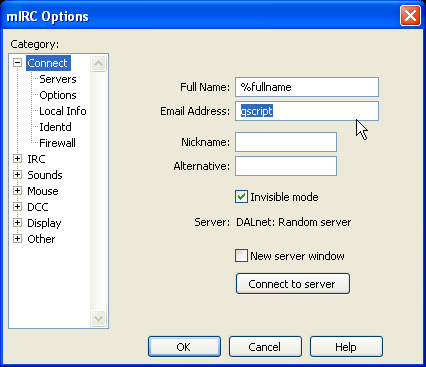
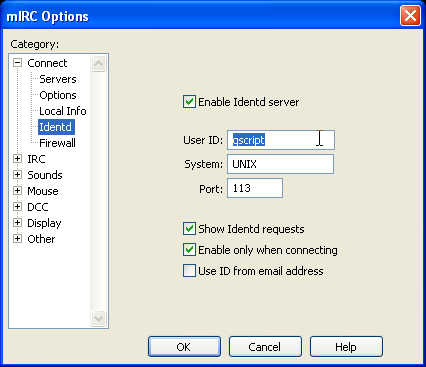
Why do I need to change both, I hear you ask. Normally if you're able to respond to the Ident request from the IRC server on connection, whatever is in the User ID field is sent back, but if you can't respond to the request for whatever reason mIRC passes the Email Address field instead.
Now as I've said before, IRC bots usually know people by their hosts so keeping both fields less than or equal to 9 characters will mean that it doesn't matter if you respond to Ident requests or not.